

Originally published December 26th, 2022
Last updated May 28th, 2025
Being faced with potential Amazon seller account suspension is one of the worst experiences a seller can have.
For new sellers or seasoned e-commerce businesses, a suspended account can halt operations and threaten your long-term success on the platform.
If you are facing a potential account suspension or have your account already deactivated, we’ve created a quick step-by-step guide to help you get your account back in Amazon’s good graces.
Step 1 - Stop and Assess
If Amazon Seller Central has hit you with a suspension notice, the first thing to do is DON’T get angry and DON’T react without a plan.
Amazon sends out performance notifications because they suspect your seller performance is so poor that it warrants suspension—or you’ve violated Amazon’s policies.
Amazon’s seller performance team closely monitors performance metrics like Order Defect Rate (ODR), Late Shipment Rate, and Pre-fulfillment Cancel Rate. When thresholds are exceeded, selling privileges are at risk.
Once you receive the suspension notice, review it carefully. Understand if the suspension is due to policy violations, negative feedback, restricted products, or even related account suspension issues.
Reasons Amazon will suspend an account
Amazon has a near-endless amount of reasons to suspend your account, but it will typically fall under a small set of reasons:
- Very poor customer experience (poor product quality, selling a used item as new, etc.)
- Selling of illegal or prohibited items (restricted items, prohibited items, etc.)
- Manipulating the platform rules (things like paying for reviews, )
- Breaking the law or going against Amazon’s rules
Sellers are also flagged for issues like counterfeit products, selling without authorization, or violating intellectual property rights associated with an ASIN.
If Amazon is right about their suspension reasons
When it looks like Amazon is correct about the reason for your suspension, then it is time to own up to your mistakes and see if you can do anything to remedy the situation.
If Amazon is wrong about their suspension reasons
Even if Amazon is in the wrong, it doesn’t mean you have the advantage and you can simply tell them.
Even experienced sellers must remain professional in the appeal process—Amazon Seller Central is not the place for emotional or vague responses.
If Amazon is incorrect in its assessment, you should still treat the matter professionally.
Like it or not, selling on Amazon is a privilege, and Amazon is extremely customer-centric.
Right or wrong, if Amazon believes they are correct they will instinctively protect the customer and shut your account down.
A good example of when Amazon is wrong about a potential suspension is when one of your listings is hacked and the images for your product don’t represent what people receive in the mail.
In this case, customers and Amazon are wrong about what’s happening, but a problem that needs fixing still exists.
While this situation is a bit unfair, it happens, and it’s on you to correct everything (your listings, your account, and Amazon).
So, when creating your POA (Plan of Action, explained in the next section) you don’t need to focus on how wrong Amazon is but provide detail about how you haven’t broken any rules, proof of that through paperwork/data, and still apologize for any confusion you may have caused.
Review Amazon’s Suspension Notice
Amazon will send you a notice of the nature of your suspension, and the reason they have either suspended your account or will suspend your account.
The suspension notice is often available in the Account Health section of your Seller Central account, under Performance Notifications.
Take note of every word they write on the nature of your suspension. See if it’s for breaking rules, selling the wrong product, selling a restricted product, or breaking the law.
When you are fully in the know about all the details, you can begin to craft a Plan of Action (POA) to appeal your suspension and let Amazon know of all the steps you’ve taken to remedy the situation.
Step 2 - Create a Plan of Action (POA)
A Plan of Action is a document that you will send over to Amazon in order to appeal your suspension and get your account reinstated.
A well-written POA is the most important step toward account reinstatement—generic appeal letters or reused templates are often rejected.
When you receive notification of your suspension (or eventual suspension) you should quickly draft a POA and send it over to Amazon through an appeal.
Don’t use your appeal for anything else other than sending a POA. That includes telling Amazon they are wrong,
Every POA looks different because the circumstances of every seller are different. Adjust your POA accordingly.
The structure of a POA
- Explain why it happened. You must explain what caused the situation in the first place. If Amazon is correct and the suspension is justified, admit to making a mistake and show evidence of how it happened.
- Show how you fixed it. Provide information, step-by-step, of everything you have done to fix the issue that has occurred. You should provide any documentation that either clears your name or shows you have fixed the problem.
- Tell how it will never happen again. Since a specific problem has gotten Amazon’s attention, you can figure out what it will take to not have that problem happen in the future. Provide an explanation as to what steps you have taken and will take to prevent this specific problem in the future.
Include supporting documentation like invoices, certificates of authenticity, or return policies to show your commitment to Amazon’s rules.
Your POA should not be a lengthy document. Amazon has to deal with thousands of sellers on a daily basis, so keeping it short and sweet should be a priority.
General Guidelines for your POA:
- Don’t use bad words
- Use plain and simple language
- Don’t submit more appeals asking if they have checked your POA yet
- Be patient, if you sent your appeal and it’s as good as it can be, you can only wait
- Focus on exactly what Amazon is taking issue with
- Don’t use a template of any kind. Draft an original document
After you’ve drafted a clear, concise, and evidence-supported POA, you can submit it to Amazon so that their team may review it.
Step 3 - Submit an Appeal
When you have your POA created, you can either find the way to send an appeal through the initial email Amazon sent to you, or you can go to your Account Health page on Seller Central (login required to view page).
You can also navigate to the 'Performance' tab in Seller Central and locate the option to submit an Amazon appeal or view the appeal process step-by-step.
Remember, submit only one appeal to Amazon, and don’t pester them for an update by submitting more appeals or reaching out to Seller Support.
They will get to your appeal eventually, and if you’ve crafted a proper Plan of Action that is structured properly, it is likely that you will get your count reactivated or they will drop the looming suspension.
And with those 3 steps, you can appeal a potential suspension to keep your account active and not freeze your business.
How to Prevent an Account Suspension on Amazon
If you’re scared of the idea of getting suspended on Amazon and want to take steps to prevent it from ever happening in the first place, we’ll go over a few areas that
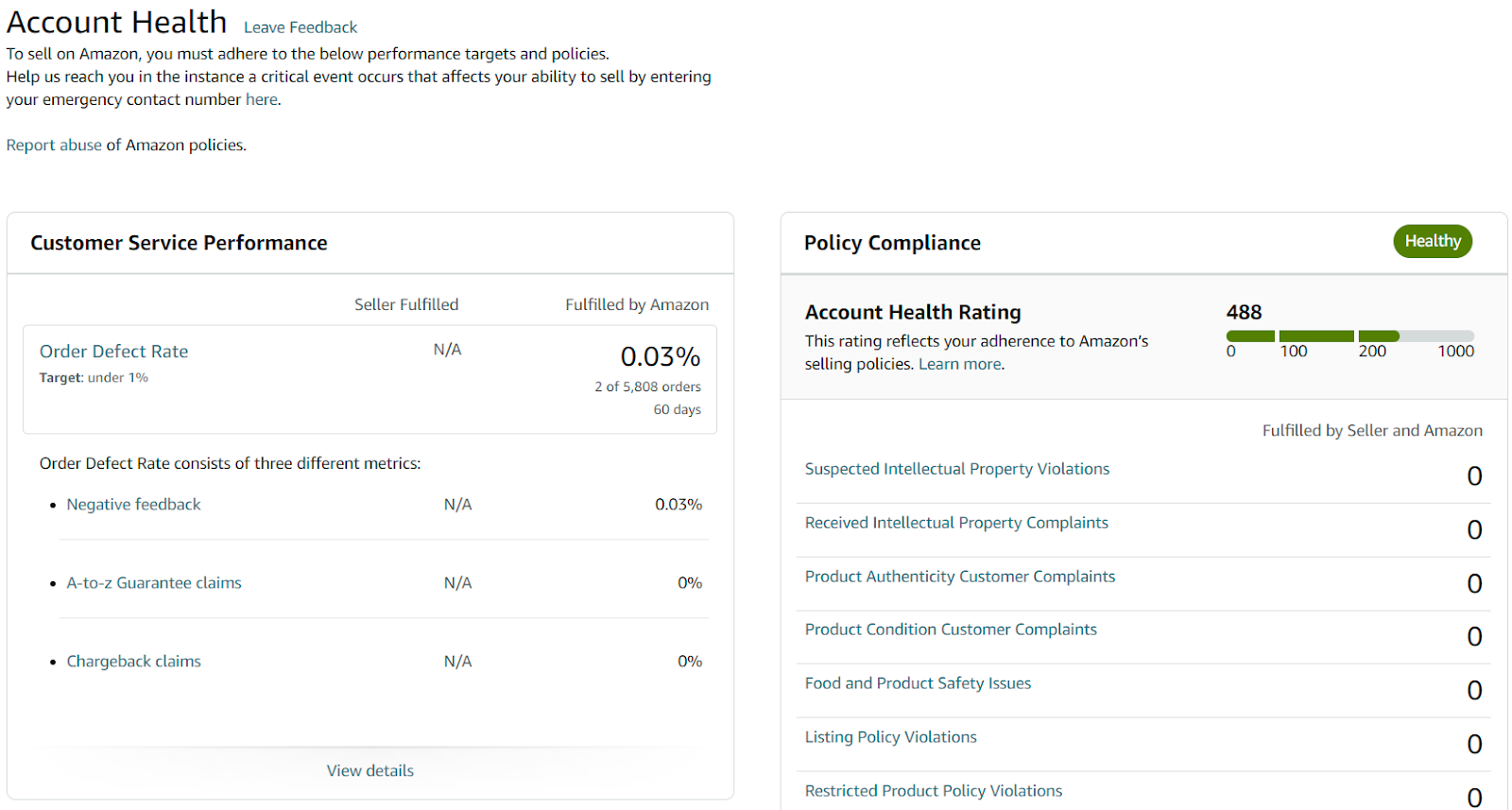
Performance - Check Your Account Health Page
As we mentioned earlier, your Account Health page is a good way to see if any of your metrics are slipping that could grab the attention of Amazon.
Good customer service and properly prepared products will make it so a potential suspension rarely or never occurs.
Watch for key metrics like cancellation rate, late shipment rate, and ODR, which Amazon uses to evaluate seller performance.
Good customer service and properly prepared products will make it so a potential suspension rarely or never occurs.
Sell accurate and well-packaged products
What I mean by this is that your listing should accurately reflect what your product is.
One thing that gets Amazon very upset is selling used products that are labeled as new products.
Listing accuracy and product authenticity are major reasons sellers receive account deactivation notices.
While it seems unlikely that most sellers would somehow sell a used product with a “New” label, it is possible that Amazon will take a return of one of your products that are obviously used and put it back in your initial stock, which can cause some confusion.
Because of this, make sure any returns from customers to Amazon get delivered to you and don’t leave it up to Amazon to determine if a product is in good enough shape to go back into stock as new.
Also, customers complain when products are damaged in shipment, which can catch Amazon’s attention. Amazon is also notoriously bad at packing products to ship, so it’s on you to properly protect your products from damage when things ship, even if you’re protecting them from Amazon itself.
Don’t sell prohibited, illegal, or products you don’t have permission to sell
A lot of people get their potential suspensions from selling something that is not allowed to be sold on Amazon, is straight-up illegal to sell, or they don’t have permission to sell a product (or they haven’t provided Amazon with the evidence that they ARE allowed to sell it).
Amazon seller support may request documentation showing brand authorization, especially when listing in restricted product categories like health, supplements, or electronics.
Whatever the case, if you aren’t sure if one of your products isn’t allowed to be sold on Amazon, either consult with a professional or determine through research if it’s a prohibited product, then if it is, take the product listing down and get your stock out of Amazon’s warehouses.
Risking your entire account by selling prohibited items is a strategy that will eventually lead to failure, so make sure you sell products that are allowed to be sold, have any and all proper certifications, and have permission from other companies if it’s not from your brand.
Conclusion
An Amazon seller account suspension can feel like a major setback, but it doesn’t have to be the end of your eCommerce journey. By staying calm, understanding the notification in detail, and crafting a thoughtful Plan of Action (POA), you dramatically improve your chances of account reinstatement. Remember, Amazon Seller Central is built on policies designed to protect customers—but that doesn’t mean you can’t recover if you approach the appeal process with the right tools and mindset.
The best strategy is to avoid a suspension in the first place by maintaining high performance metrics, monitoring your order defect rate, and only selling approved, authentic products. Whether you’re a new seller or managing a mature Amazon FBA business, keeping your account in good standing is critical to long-term success.
When in doubt, seek expert guidance, track your seller performance, and stay updated on Amazon’s rules to avoid common pitfalls. Your selling account is one of your most valuable assets—protect it accordingly.
Onramp Funds
Funding built around your sales
Connect your store and see what you qualify for. Repay as a percentage of sales, with no personal credit check.
Funding in as little as 24 hours.
