

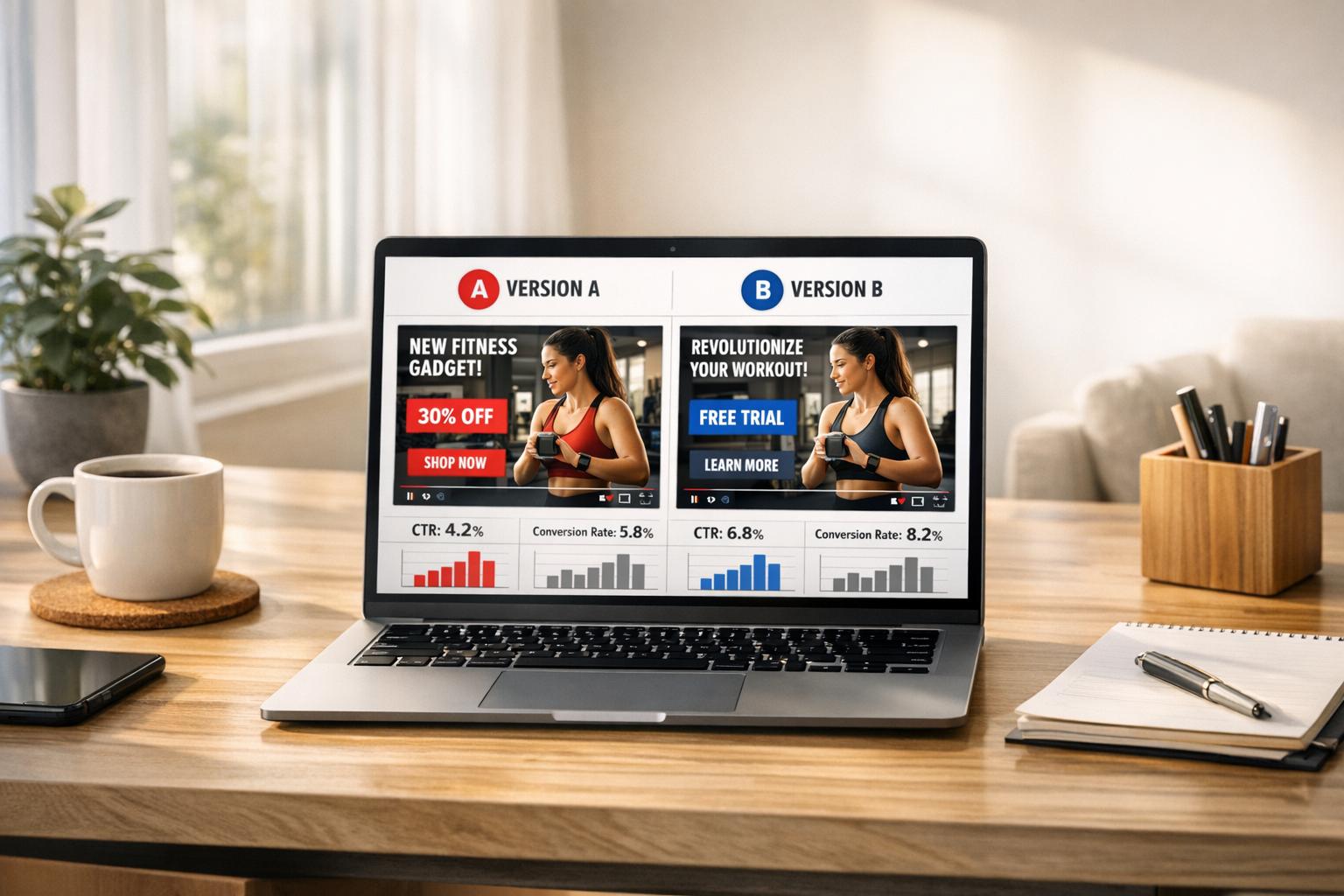
Running YouTube ads without testing is like gambling with your budget. A/B testing changes that by helping you identify which ad elements drive results - like higher sales or better ROI - and which ones don’t. With YouTube’s 2.7 billion monthly users and ad costs between $0.03–$0.30 per view, testing ensures every dollar spent works harder for you.
Here’s what you need to know:
- Creative elements drive 70% of ad success. Testing variations like thumbnails, CTAs, or ad length can reveal what gets better conversions.
- Focus on profit-driven metrics: Cost Per Acquisition (CPA), Conversion Rate (CVR), and Return on Ad Spend (ROAS) instead of vanity metrics like views.
- A/B testing minimizes risks. Test with small audiences, find what works, and scale up with confidence.
- Tools like Google Ads Experiments let you test variables (e.g., audience targeting or ad hooks) while keeping everything else constant.
Start small, test one change at a time, and use the winning strategies to optimize your YouTube ad campaigns for better performance and profitability.
What Is A/B Testing for YouTube Ads
A/B testing, also known as split testing, is a method used to compare two variations of a single ad element by changing just one variable at a time. For example, you might test two different thumbnails while keeping the video content the same, or compare a "Shop Now" button with a "Learn More" button. This approach ensures any performance differences are directly tied to the change you’re testing. Metrics like click-through rate (CTR), conversion rate, watch time, and return on ad spend (ROAS) are commonly used to measure success [2][1][3].
How A/B Testing Works
The process starts by choosing one specific element to test - this could be your video's opening hook, thumbnail, headline, or even audience targeting settings [3][4]. You then create two versions: Version A, which acts as the control, and Version B, which includes the variation. Both versions are run simultaneously across similar audience groups to reduce the impact of external factors, such as time of day or seasonal trends.
Google Ads is the go-to platform for conducting these tests, especially if your YouTube channel is linked to your Google Ads account [3]. To ensure reliable results, aim to gather at least 100 conversions per variation [1][4]. This method is widely used by major companies like Google and Microsoft, which conduct tens of thousands of A/B tests each year to fine-tune user experience and maximize revenue [2].
Benefits of A/B Testing for YouTube Ads
A/B testing can help you avoid wasting ad budget by identifying which variations perform poorly before scaling your campaign. Start by testing with a smaller audience, then expand the reach of the winning version. This method is particularly effective, considering that 87% of U.S. online users who discover new brands or products through YouTube or Google feeds take action afterward [5]. Additionally, brands that incorporate advanced data into their YouTube ad strategies have seen up to a threefold boost in purchase intent [5].
By experimenting with creative elements - such as different ad lengths or alternative call-to-action designs - you can systematically improve key metrics like cost per acquisition, conversion rates, and ROAS.
"A/B testing helps you uncover the best-performing solutions and optimally use your ad budgets." - AdEspresso [4]
The insights gained from A/B testing can also benefit your organic content strategy. For instance, if a particular thumbnail design consistently drives higher CTRs in your ads, applying that style to your regular YouTube uploads can create a synergy between your paid and organic efforts. Up next, we’ll dive into which creative elements are worth testing for the best results.
Key Elements to Test in YouTube Ads
Understanding which parts of your ad to test can mean the difference between blindly guessing and making smarter, data-backed decisions to improve your ROI. Focus on video creatives, targeting, and copy with strong CTAs to fine-tune every step of your viewer’s journey.
Video Creatives
The thumbnail, opening hook, and overall visual style are what grab - and keep - your audience's attention. Start by experimenting with ad lengths: compare short 6-second bumper ads to longer 15–30 second skippable ads. Pay attention to metrics like conversion rate, view-through rate, and cost per acquisition to determine which format aligns best with your goals [7][10]. You can also test different approaches, such as a customer testimonial versus a bold claim about results, to see what resonates most.
Even small details like color schemes and text placement can make a big difference. For instance, a finance brand might compare a sleek white background with minimal text to a more colorful gradient featuring animated callouts. The key is to tweak one element at a time so you can clearly see its impact. Use Google Ads' video experiments tool to test multiple video versions while keeping the audience and bidding strategy consistent. Stick to a single success metric, like cost per conversion, for clearer insights [10].
Targeting Options
Who you target can greatly influence your ad’s reach and conversion costs. Test different audience types, such as in-market segments, custom intent audiences, and remarketing lists [8][9][10]. For example, an eCommerce business selling kitchen gadgets might test targeting "in-market for home & garden" versus a custom audience based on searches like "meal prep tools" and "kitchen organization."
Demographics also deserve attention. Experiment with variables like age, gender, and income to see whether more refined targeting improves your return on ad spend (ROAS), even if it slightly raises costs [8][9]. A practical approach is to split your daily budget between two nearly identical campaigns, changing only the audience. Let both campaigns run until you’ve gathered enough conversions, then compare metrics like cost per acquisition and ROAS to identify the better-performing segment [8][10].
Copy and CTAs
Your headlines and calls-to-action (CTAs) play a huge role in whether viewers engage with your ad. Test direct benefit-driven statements like "Cut your ad costs by 30%" against curiosity-piquing hooks such as "You're wasting half your ad budget" [7][8]. Similarly, compare price-focused copy (e.g., "From $39/month") with value-driven messaging (e.g., "Stop stockouts before Q4 rush") to see which aligns better with your audience’s decision-making stage [7][8].
When it comes to CTAs, try variations like "Shop now", "Learn more", or "Get quote", and monitor click-through and conversion rates [8][9]. For instance, a B2B company might discover that "Learn more" generates higher-quality leads than "Start free trial", as the latter could feel too pushy. To isolate the effect of your copy changes, keep visuals and targeting consistent across tests.
How to Run A/B Tests on YouTube Ads

Running A/B tests on YouTube is all about structure and precision. YouTube’s Experiments feature lets you pit two ad versions against each other, keeping everything else constant. The idea? Change just one thing at a time so you can clearly see what’s making the difference.
Choosing Variables to Test
Stick to one variable at a time. If you tweak both the opening hook and audience targeting, you'll have no idea which adjustment actually worked. For instance, test the first five seconds of your ad: Version A might kick off with your brand logo, while Version B starts with a question like, “Tired of stockouts killing your Q4 sales?” followed by a product shot [11][12]. You could also experiment with offers - compare “Free shipping in the U.S.” with “Get 20% off your first order today.”
For audience targeting, try testing custom intent audiences based on purchase-intent keywords against in-market segments related to your product [9][10]. Whatever you’re testing, keep your campaign settings identical to ensure accurate results [11][12][9].
Setting Up the Test in Google Ads
To start, head to the Experiments tab in Google Ads, click the plus button, and choose Assets > Video > A/B test video assets [10]. This process works well for Video Reach or Video View campaigns, allowing you to test one creative variable using a control versus treatment setup [10].
Before uploading your ads, decide on a success metric - options include video view rate, click-through rate, conversion rate, cost per conversion, or cost per view [10]. Then upload your control video and your test variation, set a 50/50 traffic split, and allocate equal budgets for both [9][10].
Plan to run the test for at least two to four weeks or until you’ve gathered thousands of impressions and enough conversions to minimize random variability [12][9]. Avoid making changes to your budget, audience, or bidding strategy mid-test, as this can skew your results [9]. Once the test begins, monitor your metrics closely to determine which version performs better.
Measuring Performance Metrics
Pay attention to the metrics that matter. View rate shows how well your ad grabs attention, while click-through rate (CTR) reveals how effective your call-to-action is at driving traffic [10]. Watch time can help pinpoint where viewers lose interest, giving you insight for refining future ads.
The most critical metric, however, is cost per conversion. For example, if Version B reduces your cost per conversion from $40 to $30 without sacrificing scale, you’ve got a winner [9][10]. Also, keep an eye on return on ad spend (ROAS) in dollars to see which version brings in more revenue for every dollar spent [9][10]. Focus on metrics that directly impact your bottom line, like cost per conversion or ROAS, rather than vanity metrics like views [12][9].
Once you’ve identified the winning variation, review the detailed report in Google Ads and prepare to scale up the better-performing ad.
sbb-itb-d7b5115
Scaling Winning Variations and Maximizing ROI
Identifying and Scaling Winning Variations
After running your tests, it’s crucial to confirm statistical significance before making any changes. Google Ads will highlight a winning variation in the experiment report if the performance differences are reliable enough to act on [10]. If the results are unclear or the test hasn’t gathered enough conversions, consider extending the experiment or refining your hypothesis.
Once you’ve identified a winning variation, scale your budget carefully. Gradually increase your daily spend by 20–30% increments to avoid triggering Google’s learning phase again. Keep a close eye on key performance metrics, and be ready to pause if performance starts to dip. Breaking down performance data by device can also reveal platform-specific trends, which might warrant targeted bid adjustments or even separate campaigns. To keep your ads effective over time, continue testing and introducing fresh creative elements to counter audience fatigue. If your winning ads perform well, securing additional funds can help you scale further and maximize your ROI.
Using Onramp Funds for Ad Budget Scaling
Budget constraints often become a hurdle when it’s time to scale winning YouTube ads. That’s where revenue-based financing from Onramp Funds can make a difference. They offer equity-free funding from $10,000 to over $2 million, with repayment structured as a percentage of monthly sales (typically 8–12%) [6]. For example, if your winning ad generates $500,000 in revenue in a month, you’d repay around $4,000–$6,000 - avoiding fixed loan payments and personal credit checks.
Here’s how it works: You apply through onrampfunds.com by linking your Shopify, Amazon, or TikTok Shop account. Approval usually takes just 24–48 hours. Once approved, you can access the funds - say, $100,000 - and immediately invest in scaling your winning ad variation, increasing your monthly ad spend from $10,000 to $50,000. As your increased spending drives more sales, Onramp deducts its percentage directly from your daily deposits. One eCommerce seller used this approach to boost their ad ROAS from 4x to 7x in just three months by maintaining high spending on proven winning ads. On average, Onramp customers experience 73% revenue growth within 180 days, with 75% returning for additional funding as they continue scaling [6].
"Applied, got our offer, and had cash in our bank account within 24 hours. Their Austin, TX-based team was very professional and helped me deploy the cash to effectively grow our business." - Nick James, CEO, Rockless Table [6]
Conclusion
A/B testing transforms YouTube advertising from a guessing game into a methodical, data-driven approach to growth. By systematically experimenting with creatives, targeting, and CTAs, you can uncover the combinations that reduce cost per conversion, improve conversion rates, and maximize ROAS. This approach ensures your ad spend focuses on strategies that deliver measurable results, paving the way for confident scaling.
Let’s look at an example: An online retailer allocates $5,000 per month to YouTube ads, initially achieving a cost per purchase of $50 and a 2x ROAS. Through structured testing of elements like the opening five seconds, ad length, and CTA, they identify a creative that doubles their conversion rate. This reduces their cost per purchase to $30 and increases ROAS to 3.3x. With this winning formula, the retailer scales their monthly ad budget to $15,000 while maintaining strong performance, significantly boosting profitability. This demonstrates how fine-tuning your creative strategy can lead to measurable, impactful results. Set clear goals - such as cutting cost per conversion by 20% or increasing ROAS - and, once you achieve statistical significance, scale your budget gradually (by 20–30% increments) to sustain performance.
For eCommerce sellers with a proven YouTube funnel but limited cash flow, solutions like revenue-based financing from Onramp Funds can provide the capital needed to expand ad spend without the burden of fixed loan payments.
Even smaller advertisers can see meaningful improvements with simple tests. Adjusting the first five seconds of an ad or tweaking the offer can deliver noticeable results without requiring an elaborate setup. The secret is to always have one test in progress. By continually testing, analyzing, and reinvesting in what works, your YouTube ad campaigns can become a dependable engine for growth.
Stick to this disciplined testing approach, and over time, you’ll turn small, consistent wins into significant ROI improvements.
FAQs
How can A/B testing help maximize ROI for YouTube ads?
A/B testing is a powerful way to get the most out of your YouTube ad budget. By experimenting with different elements - like video content, headlines, calls-to-action, or targeting settings - you can pinpoint which versions resonate best with your audience and drive the highest engagement or conversions.
This method helps cut down on wasted spending by phasing out ads that don't perform well. Instead, you can channel your resources into strategies that actually deliver results. Over time, A/B testing fine-tunes your campaigns, making them sharper and more effective.
What metrics should you track during A/B testing for YouTube ads?
To make the most of A/B testing for YouTube ads, focus on key performance metrics that show how well your ads connect with your audience. Here are the metrics that matter:
- Click-through rate (CTR): This tells you how often viewers click on your ad after seeing it. A higher CTR usually means your ad is catching their attention.
- Conversion rate: Tracks how many viewers take the action you want, like signing up or making a purchase. It’s a clear indicator of how effective your ad is at driving results.
- Cost per acquisition (CPA): This metric shows how much it costs to turn one viewer into a customer. Keeping this low helps you stretch your ad budget further.
- View duration: Measures how long people stick around to watch your ad. Longer view times suggest your ad is engaging and holding their interest.
- Engagement metrics: Includes actions like likes, comments, and shares. These give you a sense of how your audience is interacting with your content.
By digging into these numbers, you can figure out which ad variations are working best, cut down on unnecessary spending, and get more bang for your buck when it comes to ROI.
What’s the best way for small advertisers to use A/B testing to improve YouTube ad performance?
Small advertisers can get the most out of A/B testing on YouTube by experimenting with different versions of their ads. Tweak one element at a time - like headlines, visuals, or calls-to-action - to pinpoint what resonates best with viewers.
Use YouTube’s ad tools to set up controlled tests, ensuring your budget is evenly split between the variations. Pay close attention to metrics such as click-through rates (CTR) and conversions to identify which ads perform the best. Start with a small budget, review the results quickly, and adjust your ads to improve ROI without stretching your spending.
Related Blog Posts
Onramp Funds
Funding built around your sales
Connect your store and see what you qualify for. Repay as a percentage of sales, with no personal credit check.
Funding in as little as 24 hours.
